理论
待补充
安装
下载kind命令,但不需要创建一个k8s集群。
执行如下命令下载kn 二进制文件
1
2
3
4
5
6
7
| wget https://github.com/knative/client/releases/download/knative-v1.2.0/kn-linux-amd64
mv kn-linux-amd64 /usr/local/bin/kn
chmod +x /usr/local/bin/kn
# 自动补全
echo -e "\n# kn" >> ~/.bash_profile
echo 'source <(kn completion bash)' >>~/.bash_profile
|
下载quickstart二进制文件
1
2
3
4
5
6
7
| wget https://github.com/knative-sandbox/kn-plugin-quickstart/releases/download/knative-v1.2.0/kn-quickstart-linux-amd64
mv kn-quickstart-linux-amd64 /usr/local/bin/kn-quickstart
chmod +x /usr/local/bin/kn-quickstart
# 如下两条命令可以得到相同的输出结果
kn quickstart --help
kn-quickstart --help
|
执行 kn quickstart kind 命令即可创建出一个knative的k8s集群。
knative serving
serving的核心功能为提供弹性扩缩容能力。
CRD
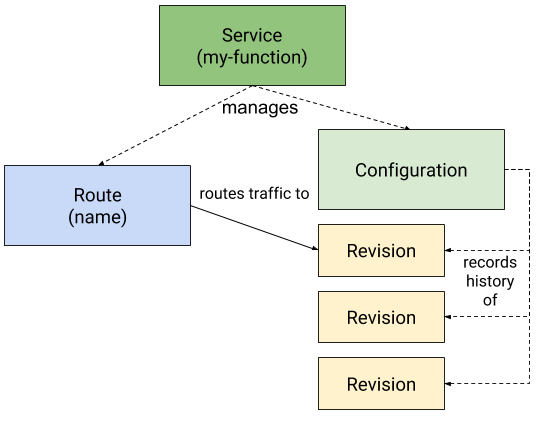 Service:用来管理整个应用的生命周期。
Route:用来将流量分发到不同的Revision
Configuration:
Revision:
Service:用来管理整个应用的生命周期。
Route:用来将流量分发到不同的Revision
Configuration:
Revision:
kpa功能
实践
最简单service
创建hello.yaml文件,内容如下,并执行 kubectl apply -f hello.yaml。其中service的名字为hello,revision的名字为world。
 1
 2
 3
 4
 5
 6
 7
 8
 9
10
11
12
13
14
15
16
17
| apiVersion: serving.knative.dev/v1
kind: Service
metadata:
name: hello
spec:
template:
metadata:
# This is the name of our new "Revision," it must follow the convention {service-name}-{revision-name}
name: hello-world
spec:
containers:
- image: gcr.io/knative-samples/helloworld-go
ports:
- containerPort: 8080
env:
- name: TARGET
value: "World"
|
通过kn命令可以看到创建了一个service hello,并且有一个可以访问的url地址。
1
2
3
| # kn service list
NAME URL LATEST AGE CONDITIONS READY REASON
hello http://hello.default.127.0.0.1.sslip.io hello-world 154m 3 OK / 3 True
|
knative抽象了Revision来标识该service对应的版本信息,可以使用kubectl命令,也可以使用kn命令来查看revision信息。
1
2
3
4
5
6
| $ k get revisions.serving.knative.dev
NAME CONFIG NAME K8S SERVICE NAME GENERATION READY REASON ACTUAL REPLICAS DESIRED REPLICAS
hello-world hello 1 True 0 0
$ kn revision list
NAME SERVICE TRAFFIC TAGS GENERATION AGE CONDITIONS READY REASON
hello-world hello 100% 1 6m33s 3 OK / 4 True
|
在宿主机上执行 curl http://hello.default.127.0.0.1.sslip.io 接口访问刚才创建的service。这里比较有意思的是为什么域名可以在宿主机上解析,该域名实际上是通过公网来解析的,域名服务器sslip.io负责该域名的解析。
本机的127.0.0.1的80端口实际是指向的是kind容器的31080端口,而31080为kourier-ingress对外暴露的服务。
1
2
| # kubectl get svc -A | grep 31080
kourier-system kourier-ingress NodePort 10.96.252.144 <none> 80:31080/TCP 3h16m
|
kourier-ingress为knative使用的ingress服务,该ingress并非k8s原生的ingress对象,而是自定义的ingress networking.internal.knative.dev/v1alpha1。service hello在创建的时候会同步创建一个ingress对象。在该ingress对象中可以看到刚才访问的域名hello.default.127.0.0.1.sslip.io,同时可以看到该ingress将域名指向到了k8s的service hello-world.default。
 1
 2
 3
 4
 5
 6
 7
 8
 9
10
11
12
13
14
15
16
17
18
19
20
21
22
23
24
25
26
27
28
29
30
31
32
33
34
35
36
37
38
39
40
41
42
43
44
45
46
47
48
49
50
51
52
53
54
55
56
57
58
59
60
61
62
63
64
65
66
67
68
69
70
71
72
73
74
| kubectl get ingresses.networking.internal.knative.dev hello -o yaml
apiVersion: networking.internal.knative.dev/v1alpha1
kind: Ingress
metadata:
annotations:
networking.internal.knative.dev/rollout: '{"configurations":[{"configurationName":"hello","percent":100,"revisions":[{"revisionName":"hello-world","percent":100}],"stepParams":{}}]}'
networking.knative.dev/ingress.class: kourier.ingress.networking.knative.dev
serving.knative.dev/creator: kubernetes-admin
serving.knative.dev/lastModifier: kubernetes-admin
finalizers:
- ingresses.networking.internal.knative.dev
generation: 1
labels:
serving.knative.dev/route: hello
serving.knative.dev/routeNamespace: default
serving.knative.dev/service: hello
name: hello
namespace: default
ownerReferences:
- apiVersion: serving.knative.dev/v1
blockOwnerDeletion: true
controller: true
kind: Route
name: hello
uid: 4c58e77b-4871-42cc-bfa0-aa9fda9646ed
spec:
httpOption: Enabled
rules:
- hosts:
- hello.default
- hello.default.svc
- hello.default.svc.cluster.local
http:
paths:
- splits:
- appendHeaders:
Knative-Serving-Namespace: default
Knative-Serving-Revision: hello-world
percent: 100
serviceName: hello-world
serviceNamespace: default
servicePort: 80
visibility: ClusterLocal
- hosts:
- hello.default.127.0.0.1.sslip.io
http:
paths:
- splits:
- appendHeaders:
Knative-Serving-Namespace: default
Knative-Serving-Revision: hello-world
percent: 100
serviceName: hello-world
serviceNamespace: default
servicePort: 80
visibility: ExternalIP
status:
conditions:
- lastTransitionTime: "2022-03-11T12:47:26Z"
status: "True"
type: LoadBalancerReady
- lastTransitionTime: "2022-03-11T12:47:26Z"
status: "True"
type: NetworkConfigured
- lastTransitionTime: "2022-03-11T12:47:26Z"
status: "True"
type: Ready
observedGeneration: 1
privateLoadBalancer:
ingress:
- domainInternal: kourier-internal.kourier-system.svc.cluster.local
publicLoadBalancer:
ingress:
- domainInternal: kourier.kourier-system.svc.cluster.local
|
在default namespace下可以看到有三个service,其中hello-world的ingress转发的service。
1
2
3
4
| # k get svc | grep hello
hello ExternalName <none> kourier-internal.kourier-system.svc.cluster.local 80/TCP 155m
hello-world ClusterIP 10.96.58.149 <none> 80/TCP 155m
hello-world-private ClusterIP 10.96.54.163 <none> 80/TCP,9090/TCP,9091/TCP,8022/TCP,8012/TCP 155m
|
通过查看该serivce的yaml,并未定义serivce的selector。
 1
 2
 3
 4
 5
 6
 7
 8
 9
10
11
12
13
14
15
16
17
18
19
20
21
22
23
24
25
26
27
28
29
30
31
32
33
34
35
36
37
38
39
40
41
42
43
44
|
apiVersion: v1
kind: Service
metadata:
  annotations:
    autoscaling.knative.dev/class: kpa.autoscaling.knative.dev
    serving.knative.dev/creator: kubernetes-admin
  labels:
    app: hello-world
    networking.internal.knative.dev/serverlessservice: hello-world
    networking.internal.knative.dev/serviceType: Public
    serving.knative.dev/configuration: hello
    serving.knative.dev/configurationGeneration: "1"
    serving.knative.dev/configurationUID: 13138d0f-ee5f-4631-94a5-6928546e504c
    serving.knative.dev/revision: hello-world
    serving.knative.dev/revisionUID: f3aaae74-6b79-4785-b60d-5607c0ab3bcf
    serving.knative.dev/service: hello
    serving.knative.dev/serviceUID: 79907029-32df-4f21-b14b-ed7d24e1a10e
  name: hello-world
  namespace: default
  ownerReferences:
  - apiVersion: networking.internal.knative.dev/v1alpha1
    blockOwnerDeletion: true
    controller: true
    kind: ServerlessService
    name: hello-world
    uid: 3a6326c5-32b0-4074-bec2-4d3eed293b71
spec:
  clusterIP: 10.96.58.149
  clusterIPs:
  - 10.96.58.149
  internalTrafficPolicy: Cluster
  ipFamilies:
  - IPv4
  ipFamilyPolicy: SingleStack
  ports:
  - name: http
    port: 80
    protocol: TCP
    targetPort: 8012
  sessionAffinity: None
  type: ClusterIP
status:
  loadBalancer: {}
|
查看Service对应的Endpoint对象,可以看到Endpoint对象实际上指向到了knative-serving下的pod activator-85bd4ddcbb-6ms7n。
 1
 2
 3
 4
 5
 6
 7
 8
 9
10
11
12
13
14
15
16
17
18
19
20
21
22
23
24
25
26
27
28
29
30
31
32
33
34
35
36
37
38
39
40
| apiVersion: v1
kind: Endpoints
metadata:
annotations:
autoscaling.knative.dev/class: kpa.autoscaling.knative.dev
serving.knative.dev/creator: kubernetes-admin
labels:
app: hello-world
networking.internal.knative.dev/serverlessservice: hello-world
networking.internal.knative.dev/serviceType: Public
serving.knative.dev/configuration: hello
serving.knative.dev/configurationGeneration: "1"
serving.knative.dev/configurationUID: 13138d0f-ee5f-4631-94a5-6928546e504c
serving.knative.dev/revision: hello-world
serving.knative.dev/revisionUID: f3aaae74-6b79-4785-b60d-5607c0ab3bcf
serving.knative.dev/service: hello
serving.knative.dev/serviceUID: 79907029-32df-4f21-b14b-ed7d24e1a10e
name: hello-world
namespace: default
ownerReferences:
- apiVersion: networking.internal.knative.dev/v1alpha1
blockOwnerDeletion: true
controller: true
kind: ServerlessService
name: hello-world
uid: 3a6326c5-32b0-4074-bec2-4d3eed293b71
subsets:
- addresses:
- ip: 10.244.0.5
nodeName: knative-control-plane
targetRef:
kind: Pod
name: activator-85bd4ddcbb-6ms7n
namespace: knative-serving
resourceVersion: "809"
uid: df916ac6-3161-4bc6-bf8c-47bb7c83cc4a
ports:
- name: http
port: 8012
protocol: TCP
|
进一步查看knative-serving下有一个knative的组件activator。
1
2
3
| k get deploy -n knative-serving activator
NAME READY UP-TO-DATE AVAILABLE AGE
activator 1/1 1 1 3h35m
|
打开终端,执行一下 kubectl get pod -l serving.knative.dev/service=hello -w,重新执行 curl http://hello.default.127.0.0.1.sslip.io 发起新的请求,可以看到会有pod产生,且pod为通过deployment拉起。
1
2
3
4
5
| $ kubectl get pod -l serving.knative.dev/service=hello -w
hello-world-deployment-7ff4bdb7fd-rqg96 0/2 Pending 0 0s
hello-world-deployment-7ff4bdb7fd-rqg96 0/2 ContainerCreating 0 0s
hello-world-deployment-7ff4bdb7fd-rqg96 1/2 Running 0 1s
hello-world-deployment-7ff4bdb7fd-rqg96 2/2 Running 0 1s
|
过一段时间没有新的请求后,pod会自动被删除,同时可以看到deployment的副本数缩成0。该namespace下并没有对应的hpa产生,说明deployment副本数的调整并非使用k8s原生的hpa机制。
1
2
3
4
5
| hello-world-deployment-7ff4bdb7fd-rqg96 2/2 Terminating 0 63s
hello-world-deployment-7ff4bdb7fd-rqg96 0/2 Terminating 0 93s
$ k get deployments.apps
NAME READY UP-TO-DATE AVAILABLE AGE
hello-world-deployment 0/0 0 0 21h
|
service的流量切分
重新提交如下的yaml文件,将service对应的revision更新为knative。
 1
 2
 3
 4
 5
 6
 7
 8
 9
10
11
12
13
14
15
16
| apiVersion: serving.knative.dev/v1
kind: Service
metadata:
name: hello
spec:
template:
metadata:
name: hello-knative
spec:
containers:
- image: gcr.io/knative-samples/helloworld-go
ports:
- containerPort: 8080
env:
- name: TARGET
value: "Knative"
|
重新查看revision,可以看到revision已经变更为了knative,同时可以看到老的revision world并没有被删除,只是没有了流量转发。
1
2
3
4
| $ kn revision list
NAME SERVICE TRAFFIC TAGS GENERATION AGE CONDITIONS READY REASON
hello-knative hello 100% 2 49s 4 OK / 4 True
hello-world hello 1 10m 3 OK / 4 True
|
重新apply新的Service,将流量切分为hello-world和hello-knative两份,重新执行curl请求,可以看到结果会随机返回。
 1
 2
 3
 4
 5
 6
 7
 8
 9
10
11
12
13
14
15
16
17
18
19
20
21
| apiVersion: serving.knative.dev/v1
kind: Service
metadata:
name: hello
spec:
template:
metadata:
name: hello-knative
spec:
containers:
- image: gcr.io/knative-samples/helloworld-go
ports:
- containerPort: 8080
env:
- name: TARGET
value: "Knative"
traffic:
- latestRevision: true
percent: 50
- revisionName: hello-world
percent: 50
|
查看revision的信息,可以看到流量已经是50%的切分了。
1
2
3
4
| # kn revision list
NAME SERVICE TRAFFIC TAGS GENERATION AGE CONDITIONS READY REASON
hello-knative hello 50% 2 11m 3 OK / 4 True
hello-world hello 50% 1 21m 3 OK / 4 True
|
knative eventing
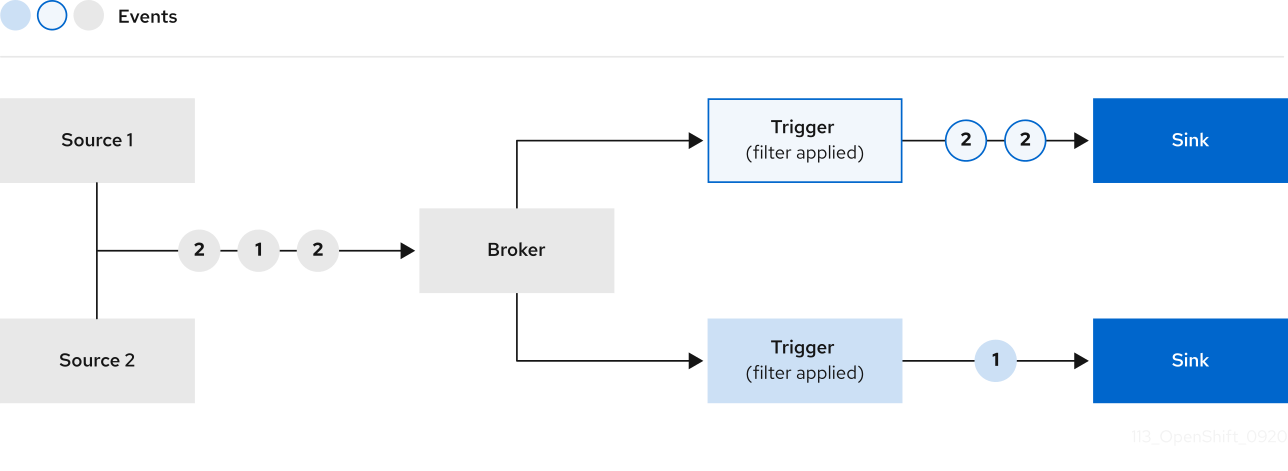 Source:k8s的CR对象,产生Event
Broker:用来分发Event
Trigger:Event触发器
Sink:Event输出结果
Source:k8s的CR对象,产生Event
Broker:用来分发Event
Trigger:Event触发器
Sink:Event输出结果
其中包含业务逻辑的可编程的部分在于Trigger部分,由于trigger实际上是无状态的服务,对于一些有状态的消息knative很难满足。比如同一类型的特定字段的event转发到特定的trigger上,broker实际上不具备可编程性,因此无法完成。
kn quickstart 命令会安装一个broker到环境中
 1
 2
 3
 4
 5
 6
 7
 8
 9
10
11
12
13
14
15
16
17
18
19
20
21
22
23
24
25
26
27
28
29
30
31
32
33
34
35
36
37
38
39
40
41
42
43
44
45
46
47
48
49
50
51
| $ k get brokers.eventing.knative.dev example-broker -o yaml
apiVersion: eventing.knative.dev/v1
kind: Broker
metadata:
annotations:
eventing.knative.dev/broker.class: MTChannelBasedBroker
eventing.knative.dev/creator: kubernetes-admin
eventing.knative.dev/lastModifier: kubernetes-admin
name: example-broker
namespace: default
spec:
config:
apiVersion: v1
kind: ConfigMap
name: config-br-default-channel
namespace: knative-eventing
delivery:
backoffDelay: PT0.2S
backoffPolicy: exponential
retry: 10
status:
address:
url: http://broker-ingress.knative-eventing.svc.cluster.local/default/example-broker
annotations:
knative.dev/channelAPIVersion: messaging.knative.dev/v1
knative.dev/channelAddress: http://example-broker-kne-trigger-kn-channel.default.svc.cluster.local
knative.dev/channelKind: InMemoryChannel
knative.dev/channelName: example-broker-kne-trigger
conditions:
- lastTransitionTime: "2022-03-11T12:32:43Z"
status: "True"
type: Addressable
- lastTransitionTime: "2022-03-11T12:32:43Z"
message: No dead letter sink is configured.
reason: DeadLetterSinkNotConfigured
severity: Info
status: "True"
type: DeadLetterSinkResolved
- lastTransitionTime: "2022-03-11T12:32:43Z"
status: "True"
type: FilterReady
- lastTransitionTime: "2022-03-11T12:32:43Z"
status: "True"
type: IngressReady
- lastTransitionTime: "2022-03-11T12:32:43Z"
status: "True"
type: Ready
- lastTransitionTime: "2022-03-11T12:32:43Z"
status: "True"
type: TriggerChannelReady
observedGeneration: 1
|
快速开始
创建如下的Service,该service通过环境变量 BROKER_URL 作为broker地址,可以看到其地址为 quickstart工具默认安装的example-broker。
 1
 2
 3
 4
 5
 6
 7
 8
 9
10
11
12
13
14
15
| apiVersion: serving.knative.dev/v1
kind: Service
metadata:
name: cloudevents-player
spec:
template:
metadata:
annotations:
autoscaling.knative.dev/min-scale: "1"
spec:
containers:
- image: ruromero/cloudevents-player:latest
env:
- name: BROKER_URL
value: http://broker-ingress.knative-eventing.svc.cluster.local/default/example-broker
|
访问service页面 http://cloudevents-player.default.127.0.0.1.sslip.io/ 可以在界面上创建Event后,产生如下的Event内容,格式完全遵循社区的CloudEvent规范。点击发送,即可以将消息发送给broker,但由于borker没有配置任何的Trigger,消息在发送到broker后会被直接丢弃。
 1
 2
 3
 4
 5
 6
 7
 8
 9
10
11
12
13
14
15
16
| {
"root": {
"attributes": {
"datacontenttype": "application/json",
"id": "123",
"mediaType": "application/json",
"source": "manual",
"specversion": "1.0",
"type": "test-type"
},
"data": {
"message": "Hello CloudEvents!"
},
"extensions": {}
}
}
|
我们继续来给broker增加触发器,创建如下的yaml。该触发器定义了broker为example-broker,
 1
 2
 3
 4
 5
 6
 7
 8
 9
10
11
12
13
| apiVersion: eventing.knative.dev/v1
kind: Trigger
metadata:
name: cloudevents-trigger
annotations:
knative-eventing-injection: enabled
spec:
broker: example-broker
subscriber:
ref:
apiVersion: serving.knative.dev/v1
kind: Service
name: cloudevents-player
|
重新在页面上发送event,可以看到消息的状态为接收。
参考