ipip协议为在ip协议报文的基础上继续封装ip报文,基于tun设备实现,是一种点对点的通讯技术。
install
ipip需要内核模块ipip的支持
1
2
3
4
5
| $ modprobe ipip
$ lsmod | grep ipip
ipip 13465 0
tunnel4 13252 1 ipip
ip_tunnel 25163 1 ipip
|
实战
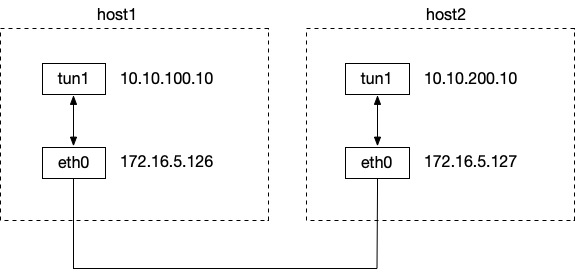
两台主机:172.16.5.126(host1)和172.16.5.127(host2)
在host1上创建tun1设备,执行如下命令:
 1
 2
 3
 4
 5
 6
 7
 8
 9
10
11
12
13
14
15
16
17
18
19
20
21
22
| # 用来创建tun1设备,并ipip协议的外层ip,目的ip为172.16.5.127, 源ip为172.16.5.126
ip tunnel add tun1 mode ipip remote 172.16.5.127 local 172.16.5.126
# 给tun1设备增加ip地址,并设置tun1设备的对端ip地址为10.10.200.10
ip addr add 10.10.100.10 peer 10.10.200.10 dev tun1
ip link set tun1 up
$ ifconfig tun1
tun1: flags=209<UP,POINTOPOINT,RUNNING,NOARP> mtu 1480
inet 10.10.100.10 netmask 255.255.255.255 destination 10.10.200.10
tunnel txqueuelen 1000 (IPIP Tunnel)
RX packets 0 bytes 0 (0.0 B)
RX errors 0 dropped 0 overruns 0 frame 0
TX packets 0 bytes 0 (0.0 B)
TX errors 0 dropped 0 overruns 0 carrier 0 collisions 0
# 增加一条路由,所有到达10.10.200.10的请求会经过设备tun1
$ route -n
Kernel IP routing table
Destination Gateway Genmask Flags Metric Ref Use Iface
0.0.0.0 172.16.7.253 0.0.0.0 UG 0 0 0 eth0
10.10.200.10 0.0.0.0 255.255.255.255 UH 0 0 0 tun1
172.16.0.0 0.0.0.0 255.255.248.0 U 0 0 0 eth0
|
同样在host2上创建tun1设备:
1
2
3
| ip tunnel add tun1 mode ipip remote 172.16.5.126 local 172.16.5.127
ip addr add 10.10.200.10 peer 10.10.100.10 dev tun1
ip link set tun1 up
|
并分别在host1和host2上打开ip_forward功能
1
| echo 1 > /proc/sys/net/ipv4/ip_forward
|
然后在host1上ping 10.10.200.10,可以ping通。
在host1的tun1上抓包,可以看到正常的ping包。
在host1的eth1上抓包,可以看到已经是ipip的数据包了。
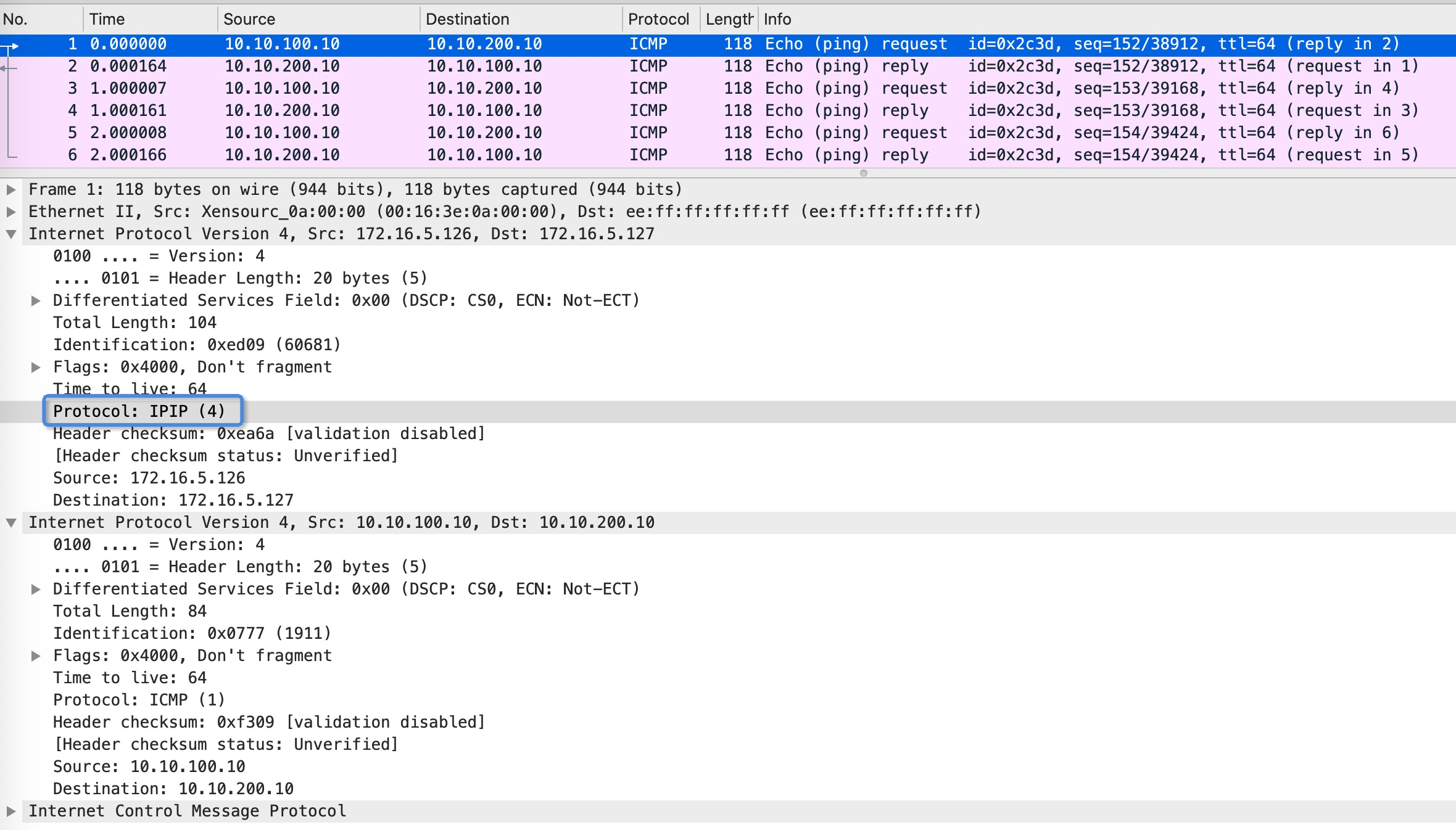
tun1.pcap
清理现场分别在两台主机上执行
ref